Kubuntu начинающим | Страница 16 | Крымский форум

Kubuntu начинающим

  • Добро пожаловать на форум! Рады видеть вас здесь! Зарегистрируйтесь или Войдите в аккаунт, чтобы иметь полный доступ к площадке!
Цитата(Rumata @ 22 Сентября, 2009, 22:33)
здравствуй дедушка Debian

так не долго и на слаку пересесть, а потом и самосборные дистры начнуться ;-)
 
не надо на дебиан гнать
хорошая вещь
это бубунта ему репутацию подпортила
 
Eugene
да никто и не гнал
smile.gif
просто AGUtilities озвучил перспективу
 
подскажите через что это можно сделать на раб столе?
с прозрачным фоном чтобы текст
 

Вложения

  • 11.jpg
    11.jpg
    51.5 KB · Просмотры: 0
Подскажите что за ерунда стоит ubuntu 9.04 и постояно сбрасывается инет подключения по PPPoE
тоесть настройка все норм на 8,10 такого не замечал
проходит хаотичное время(рандом) и инет сам по себе выключается и мне приходится в ручную его поднимать
пишу
sudo poff dsl-provider
и затем
sudo pon dsl-provider
и тока тогда снова инет подключается что может быть за беда?
 
Serega555
А что при этом в /var/log/syslog и что прописано в /etc/ppp/peers/dsl-provider ?
 
Код
# Minimalistic default options file for DSL/PPPoE connections

noipdefault
defaultroute
replacedefaultroute
hide-password
#lcp-echo-interval 30
#lcp-echo-failure 4
noauth
persist
#mtu 1492
#persist
#maxfail 0
#holdoff 20
plugin rp-pppoe.so eth1
usepeerdns
user "ukrloginthe@dsl.ukrtel.net"


и вот последнии строчки в логах
Код
Oct 16 23:50:57 shell kernel: [14079.929196] pcieport-driver 0000:00:0f.0: setting latency timer to 64
Oct 16 23:50:57 shell kernel: [14079.945024] eth0: link up, 100Mbps, full-duplex, lpa 0x45E1
Oct 16 23:50:57 shell kernel: [14079.961045] r8169 0000:03:00.0: restoring config space at offset 0x1 (was 0x100400, writing 0x100407)
Oct 16 23:50:57 shell kernel: [14079.961080] r8169 0000:03:00.0: PME# disabled
Oct 16 23:50:57 shell kernel: [14079.961116] NVRM: RmPowerManagement: 5
Oct 16 23:50:57 shell kernel: [14080.012113] r8169: eth1: link up
Oct 16 23:50:57 shell kernel: [14080.060569] serial 00:09: activated
Oct 16 23:50:57 shell kernel: [14080.061440] parport_pc 00:0a: activated
Oct 16 23:50:57 shell kernel: [14080.061525] sd 6:0:1:0: [sda] Starting disk
Oct 16 23:50:57 shell kernel: [14080.224539] PM: Image restored successfully.
Oct 16 23:50:57 shell kernel: [14080.277731] Restarting tasks ... done.
Oct 16 23:50:57 shell kernel: [14080.287337] PM: Basic memory bitmaps freed
Oct 16 23:50:57 shell kernel: [14080.390230] ata1: SATA link down (SStatus 0 SControl 300)
Oct 16 23:50:57 shell kernel: [14080.407217] ata2: SATA link down (SStatus 0 SControl 300)
Oct 16 23:50:57 shell kernel: [14080.417426] ata6: SATA link down (SStatus 0 SControl 300)
Oct 16 23:50:57 shell kernel: [14080.427635] ata3: SATA link down (SStatus 0 SControl 300)
Oct 16 23:50:57 shell kernel: [14080.437840] ata5: SATA link down (SStatus 0 SControl 300)
Oct 16 23:50:57 shell kernel: [14080.438242] ata4: SATA link down (SStatus 0 SControl 300)
Oct 16 23:51:07 shell anacron[833]: Anacron 2.3 started on 2009-10-16
Oct 16 23:51:07 shell anacron[833]: Normal exit (0 jobs run)
Oct 16 23:51:07 shell acpid: client 2980[0:0] has disconnected
Oct 16 23:51:07 shell acpid: client connected from 2980[0:0]
Oct 16 23:51:07 shell NetworkManager: <info> Waking up...
Oct 16 23:51:07 shell NetworkManager: <info> (ttyS0): ignoring due to lack of mobile broadband capabilties
Oct 16 23:51:07 shell NetworkManager: <info> Unmanaged Device found; state CONNECTED forced. (see http://bugs.launchpad.net/bugs/191889)
 
Serega555
М-м-м... а pppoe чем стартуется-то? Потому как я не использую NetworkManager, а всё по старинке:
Код
# cat /etc/ppp/peers/adsl-ut
noipdefault
hide-password
lcp-echo-interval 15
lcp-echo-failure 4
noauth
mtu 1492
unit 700
persist
plugin rp-pppoe.so eth1
user "user@dsl.ukrtel.net"

# grep adsl-ut /etc/inittab
TP:23:respawn:/usr/sbin/pppd nodetach call adsl-ut


P.S. Но у меня не Ubintu, у меня Debian
 
устанавливал так в консоли sudo pppoeconf
ну если автоматом не стартуется то командой запускаю
sudo pon dsl-provider
 
Цитата(Serega555 @ 17 Октября, 2009, 16:47)
ну если автоматом не стартуется то командой запускаю

Ну вот и кто у вас в роли автомата-то?
smile.gif
Я просто как-то не сильно доверяю всяким там NetworkManager'ам и прочей около-GUI'шным штукам...
Собственно к чему спич похоже, что у вас этот самый «автомат» и подглючивает, раз pppoe-соединение падает и боле, пока руками в консоли не дёрнешь, не поднимается.
 
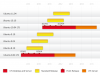
апрель 2010 очередной релиз.


[attachmentid=14705]
 

Вложения

  • ubuntu_release_cycle.png
    ubuntu_release_cycle.png
    28.7 KB · Просмотры: 1
Подскажите как добавить альтернативный днс сервер
настройки сети
IP:10.10.30.189
Mask: 255.255.255.0
Шлюз: 10.10.30.1
DNS: 10.10.200.10
Alt DNS: 10.10.30.1


делаю так
ifconfig eth0 10.10.30.189 netmask 255.255.255.0 broadcast 10.10.30.1
route add default gw 10.10.200.10
echo "nameserver 10.10.200.10" > /etc/resolv.conf

а как добавить альтернативный?

так будет правильно?
sudo gedit /etc/resolv.conf
и там
nameserver 10.10.200.10
nameserver 10.10.30.1
 
Дистрибут 9,10 убунта ядро 2.6.32
Привет решил пересобрать ядро так сказать выкинуть мусор но не получается до конца
sudo -s -H
apt-get install build-essential bin86 kernel-package
apt-get install libqt3-headers libqt3-mt-dev

1)выкинул с ядра всё что не нужно
2)make bzImage modules modules_install install
установил всё хорошо без ерроров
3)root@shell:/usr/src/linux# cp /usr/src/linux/arch/i386/boot/bzImage /boot
скопировал в бут раздел
sudo gedit /boot/grub/menu.lst

огрызок из из меню.лст
# title
root (hd0,1)
kernel /boot/bzImage root=/dev/hda2

# title Linux_my
# root (hd0,1)
# kernel /bzImage root=/dev/hda2 ro
вот вобще конфиг получился
#
# examples
#
# title Windows 95/98/NT/2000
# root (hd0,0)
# makeactive
# chainloader +1
#
# title linux
kernel /vmlinuz-2.6.1-my root=/dev/hda2 hdc=ide-scsi vga=791 splash=silent
initrd /initrd-empty.splash
boot

# title Linux
# root (hd0,1)
# kernel /vmlinuz root=/dev/hda2 ro
#
# title
root (hd0,1)
kernel /boot/bzImage root=/dev/hda2

# title Linux_my
# root (hd0,1)
# kernel /bzImage root=/dev/hda2 ro
#
#
#
# Put static boot stanzas before and/or after AUTOMAGIC KERNEL LIST
затем делаю
5)sudo update-grub

Searching for GRUB installation directory ... found: /boot/grub
Searching for default file ... found: /boot/grub/default
Testing for an existing GRUB menu.lst file ... found: /boot/grub/menu.lst
Searching for splash image ... none found, skipping ...
Found kernel: /boot/vmlinuz-2.6.32
Found kernel: /boot/vmlinuz-2.6.31-16-generic
Found kernel: /boot/vmlinuz-2.6.28-11-generic
Found kernel: /boot/memtest86+.bin
Replacing config file /var/run/grub/menu.lst with new version
Updating /boot/grub/menu.lst ... done

старое ядро видет новое нет
где я чтото не так сделал или не доделал?
на компе стоит 1 винт иде на 40гб
[hide]# menu.lst - See: grub(8), info grub, update-grub(8)
# grub-install(8), grub-floppy(8),
# grub-md5-crypt, /usr/share/doc/grub
# and /usr/share/doc/grub-doc/.

## default num
# Set the default entry to the entry number NUM. Numbering starts from 0, and
# the entry number 0 is the default if the command is not used.
#
# You can specify 'saved' instead of a number. In this case, the default entry
# is the entry saved with the command 'savedefault'.
# WARNING: If you are using dmraid do not use 'savedefault' or your
# array will desync and will not let you boot your system.
default 0

## timeout sec
# Set a timeout, in SEC seconds, before automatically booting the default entry
# (normally the first entry defined).
timeout 3

## hiddenmenu
# Hides the menu by default (press ESC to see the menu)
hiddenmenu

# Pretty colours
#color cyan/blue white/blue

## password ['--md5'] passwd
# If used in the first section of a menu file, disable all interactive editing
# control (menu entry editor and command-line) and entries protected by the
# command 'lock'
# e.g. password topsecret
# password --md5 $1$gLhU0/$aW78kHK1QfV3P2b2znUoe/
# password topsecret

#
# examples
#
# title Windows 95/98/NT/2000
# root (hd0,0)
# makeactive
# chainloader +1
#
# title linux
kernel /vmlinuz-2.6.1-my root=/dev/hda2 hdc=ide-scsi vga=791 splash=silent
initrd /initrd-empty.splash
boot

# title Linux
# root (hd0,1)
# kernel /vmlinuz root=/dev/hda2 ro
#
# title
root (hd0,1)
kernel /boot/bzImage root=/dev/hda2

# title Linux_my
# root (hd0,1)
# kernel /bzImage root=/dev/hda2 ro
#
#
#
# Put static boot stanzas before and/or after AUTOMAGIC KERNEL LIST

### BEGIN AUTOMAGIC KERNELS LIST
## lines between the AUTOMAGIC KERNELS LIST markers will be modified
## by the debian update-grub script except for the default options below

## DO NOT UNCOMMENT THEM, Just edit them to your needs

## ## Start Default Options ##
## default kernel options
## default kernel options for automagic boot options
## If you want special options for specific kernels use kopt_x_y_z
## where x.y.z is kernel version. Minor versions can be omitted.
## e.g. kopt=root=/dev/hda1 ro
## kopt_2_6_8=root=/dev/hdc1 ro
## kopt_2_6_8_2_686=root=/dev/hdc2 ro
# kopt=root=UUID=3358fbb8-180f-4804-aad5-7a887b92c598 ro

## default grub root device
## e.g. groot=(hd0,0)
# groot=3358fbb8-180f-4804-aad5-7a887b92c598

## should update-grub create alternative automagic boot options
## e.g. alternative=true
## alternative=false
# alternative=true

## should update-grub lock alternative automagic boot options
## e.g. lockalternative=true
## lockalternative=false
# lockalternative=false

## additional options to use with the default boot option, but not with the
## alternatives
## e.g. defoptions=vga=791 resume=/dev/hda5
# defoptions=quiet splash

## should update-grub lock old automagic boot options
## e.g. lockold=false
## lockold=true
# lockold=false

## Xen hypervisor options to use with the default Xen boot option
# xenhopt=

## Xen Linux kernel options to use with the default Xen boot option
# xenkopt=console=tty0

## altoption boot targets option
## multiple altoptions lines are allowed
## e.g. altoptions=(extra menu suffix) extra boot options
## altoptions=(recovery) single
# altoptions=(recovery mode) single

## controls how many kernels should be put into the menu.lst
## only counts the first occurence of a kernel, not the
## alternative kernel options
## e.g. howmany=all
## howmany=7
# howmany=all

## specify if running in Xen domU or have grub detect automatically
## update-grub will ignore non-xen kernels when running in domU and vice versa
## e.g. indomU=detect
## indomU=true
## indomU=false
# indomU=detect

## should update-grub create memtest86 boot option
## e.g. memtest86=true
## memtest86=false
# memtest86=true

## should update-grub adjust the value of the default booted system
## can be true or false
# updatedefaultentry=false

## should update-grub add savedefault to the default options
## can be true or false
# savedefault=false

## ## End Default Options ##

title Ubuntu 9.10, kernel 2.6.32
uuid 3358fbb8-180f-4804-aad5-7a887b92c598
kernel /boot/vmlinuz-2.6.32 root=UUID=3358fbb8-180f-4804-aad5-7a887b92c598 ro quiet splash
quiet

title Ubuntu 9.10, kernel 2.6.32 (recovery mode)
uuid 3358fbb8-180f-4804-aad5-7a887b92c598
kernel /boot/vmlinuz-2.6.32 root=UUID=3358fbb8-180f-4804-aad5-7a887b92c598 ro single

title Ubuntu 9.10, kernel 2.6.31-16-generic
uuid 3358fbb8-180f-4804-aad5-7a887b92c598
kernel /boot/vmlinuz-2.6.31-16-generic root=UUID=3358fbb8-180f-4804-aad5-7a887b92c598 ro quiet splash
initrd /boot/initrd.img-2.6.31-16-generic
quiet

title Ubuntu 9.10, kernel 2.6.31-16-generic (recovery mode)
uuid 3358fbb8-180f-4804-aad5-7a887b92c598
kernel /boot/vmlinuz-2.6.31-16-generic root=UUID=3358fbb8-180f-4804-aad5-7a887b92c598 ro single
initrd /boot/initrd.img-2.6.31-16-generic

title Ubuntu 9.10, kernel 2.6.28-11-generic
uuid 3358fbb8-180f-4804-aad5-7a887b92c598
kernel /boot/vmlinuz-2.6.28-11-generic root=UUID=3358fbb8-180f-4804-aad5-7a887b92c598 ro quiet splash
initrd /boot/initrd.img-2.6.28-11-generic
quiet

title Ubuntu 9.10, kernel 2.6.28-11-generic (recovery mode)
uuid 3358fbb8-180f-4804-aad5-7a887b92c598
kernel /boot/vmlinuz-2.6.28-11-generic root=UUID=3358fbb8-180f-4804-aad5-7a887b92c598 ro single
initrd /boot/initrd.img-2.6.28-11-generic

title Ubuntu 9.10, memtest86+
uuid 3358fbb8-180f-4804-aad5-7a887b92c598
kernel /boot/memtest86+.bin
quiet

### END DEBIAN AUTOMAGIC KERNELS LIST[/hide]

 
ух уж мне убунтоиты
smile.gif

Serega555
ведро советую пересобирать таким методом
Код
make menuconfig
make -jN(где N количество ядер проца +1, это существенно ускорит сборку)
make modules
make modules_install
make install


потом создайте 2 симлинка
один на новое ядро, назовем его vmlinuz и на старое назовем его vmlinuz.old
вот просто пример удобного груб конфига

Код

default 1
timeout 1
splashimage=(hd0,0)/boot/grub/splash.xpm.gz

title 2.6.27-gentoo-r10-work4
root (hd0,0)
kernel /boot/2.6.27-gentoo-r10-work4 root=/dev/sda3

title Gentoo Linux 2.6.27-gentoo-r10test3
root (hd0,0)
kernel /boot/2.6.27-gentoo-r10test3 root=/dev/sda3

title Gentoo Linux 2.6.27-gentoo-r10-work5
root (hd0,0)
kernel /boot/2.6.27-gentoo-r10-work5 root=/dev/sda3


title Windows
rootnoverify (hd0,1)
chainloader +1

главное проверьте что у вас примонтирован раздел /boot
и что такое gru-update
biggrin.gif
груб при загрузке сам читает свой конфиг
будут вопросы обращайтесь
smile.gif
 
Подскажите, плз)
В общем, есть комп, в нем - 3 сетевухи. Одна смотрит в Инет через vpn, две другие - должны раздавать Инет на другой комп и ноут.
На экспихе все работало хорошо. Просто расшарили подключение - и гуд. А сейчас установили Убунту и шо-та не получается расшаривать. Сам Инет настроился легко.
Прочитали, шо можно поднять прокси-сервер через сквид. Установили его, но понять, что писать в squid.conf, не можем. Кто-нить сталкивался с ентим делом?
blush2.gif
 
upd
Подумываем, мож, проще купить роутер? Через него же можно разделить vpn-соединение? Подскажите, плз, самый приемлемый вариант по соотношению цена/качество?
 
Heavenward
Да не стоит выкидывать деньги на роутер, если есть линуха.

в файле /etc/network/interfaces прописываете (пример):

Код
auto lo
iface lo inet loopback


auto eth0 # Допустим это та сетевуха которая смотрит к провайдеру
iface eth0 inet dhcp
#или
#iface eth0 inet static
#address 192.168.0.234
#netmask 255.255.255.0
#gateway 192.168.0.253

auto ppp0
iface ppp0 inet ppp
provider my_provider
pre-up ip link set eth0 up
up route del default
up route add default dev ppp0


auto eth1 # Допустим это та сетевуха которая смотрит к внутреннему компу/ноуту
iface eth1 inet static
address 10.0.0.253
netmask 255.255.255.0
gateway 10.0.0.253

auto eth2 # Допустим это та сетевуха которая смотрит к внутреннему компу/ноуту - вторая внутренняя сетевуха
iface eth2 inet static
address 11.0.0.253
netmask 255.255.255.0
gateway 11.0.0.253


Это при условии что VPN (pptp) настроен. если нет - то читаем это


Далее нужно разрешить форвардинг :
Код
echo 1 > /proc/sys/net/ipv4/ip_forward


и маскарадинг:
Код

iptables -t nat -A POSTROUTING -s 10.0.0.0/24 -d 0/0 -j MASQUERADE
iptables -t nat -A POSTROUTING -s 11.0.0.0/24 -d 0/0 -j MASQUERADE


то есть даем доступ к интернету всем из внутренней сети.

Это простейший вариант без фаервола и всего прочего.
 
О, спасибо, дружище, что откликнулся
smile.gif

Уже завтра пробанем, а то ща ваще моск не пашет.
С фаерволом тоже пробовали заморочиться, но че-та тоже не получилось. Сафсем чайныкы, угу
blush2.gif
 
А вот присоветуйте приличный мультиаккаунтный jabber-клиент, а? Не консольный это обязательно. Вот что-то типа виндовой miranda im 0.8.x, т.е. не слишком замысловатое в настройках
smile.gif
 
Назад
Сверху